Best Practices
Data Science/ML Projects
These are some of the best practices for developing and maintaining code in data science and machine learning projects to ensure clarity, maintainability, and efficient workflows. While these guidelines are primarily intended for projects that are ready for production and undergoing code review, it is beneficial to keep them in mind during the exploratory data analysis (EDA) phase. Implementing these practices early can significantly reduce the amount of refactoring required later. However, during the EDA phase, the focus should remain on quick analyses to demonstrate value and feasibility, so it’s not necessary to fully adhere to these guidelines at this stage.
Project Organization and Workflow
This section outlines how projects should be structured and how development workflows can be managed to ensure consistency and collaboration.
Project Repositories
- Separate Repositories: Maintain a separate repository for each project unless they are closely related. This approach keeps the codebase organized and manageable.
- Project Templates: Use the template repository, mlops-template, as a template for new projects. This helps standardize folder structures and code examples across projects.
- Consistent Folder Structure: Align your folder structure with mlops-template, to facilitate easy navigation and maintain consistency across all projects.
- Exploratory Notebooks: Store exploratory notebooks in the dedicated folder named notebooks. Further organize them by project or experiment, using descriptive names that include project and experiment details. Example: notebooks/hook_load_anomaly_detection/drilling_experiment
Development Workflow
- Separate EDA and Source Code: Use the source project folder to effectively organize production code and workflow notebooks. Exclude exploratory data analysis (EDA) files from the production source files to minimize clutter and maintain a clean, efficient structure. Use notebooks for EDA tasks, naming them descriptively and including numbering to indicate their sequence (e.g., 01_data_exploration.ipynb).
- Frequent Commits: Commit code frequently during both Proof-of-Concept (PoC) and production phases. This practice helps track progress, facilitates collaboration, and provides the ability to revert changes when needed.
Code Style, Cleanliness, and Efficiency
This section provides guidelines for writing clean, readable, efficient, and maintainable code.
General Code Style
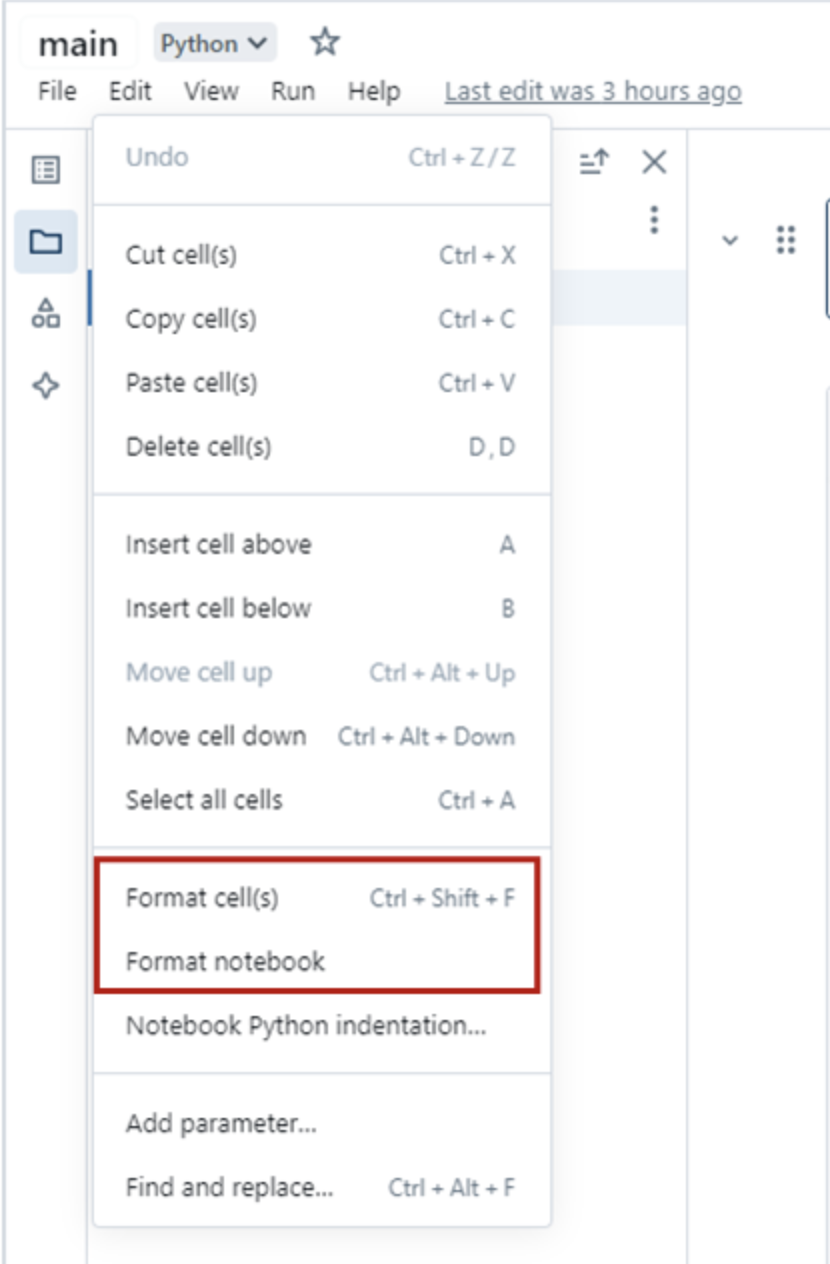
PEP 8 Compliance: Follow PEP 8 style guidelines for code readability and maintainability. Use tools like Databricks’ Python formatter or GitHub Copilot to enforce this automatically. You can access the automatic cell and notebook formatting feature in Databricks by navigating to the Edit menu within a Databricks notebook, as shown below:
Descriptive Variable Names: Use descriptive variable names in snake_case (e.g., total_sales) and avoid ambiguous names like l, O, or I.
Column Naming
Ensure Spark Compatibility: Avoid invalid characters in column names (e.g., spaces, hyphens, periods) or starting names with digits to ensure compatibility with Spark.
Example: Use total_sales instead of total-sales or sales.total.
Docstrings and Type Hinting
Type Hinting: Highly recommended for functions with complex signatures to improve code readability and enable static type checking.
Example: def calculate_maintenance(df: pd.DataFrame) -> float: pass
Docstring Style: Include docstrings for functions and classes. Use single-line or multi-line docstrings depending on the complexity.
Example: def process_data(df: pd.DataFrame) -> pd.DataFrame: “““Processes the given data.
Args: df: A DataFrame containing the raw data.
Returns: Processed DataFrame. "”” pass
Simple Functions: For straightforward functions, type hinting can eliminate the need for a docstring.
Example: def add(a: int, b: int) -> int: return a + b
Functions and Comments
Use Functions Effectively: Keep functions small, clear, and descriptive. Refactor complex code into functions with well-defined names and clear documentation.
Write Clear Code: Code should ideally be self-explanatory through meaningful names and logical structure.
Use Comments When Necessary: Use comments sparingly to clarify complex sections, but ensure the code itself is clear enough to minimize the need for comments. Write comments as full sentences with proper grammar, placing them above the code they reference.
Remove Commented-Out Code: If code is commented out, remove it or store it in version control using Git to avoid cluttering the workspace.
Code Cleanliness and Efficiency
Avoid Redundancy: Follow the DRY (Don’t Repeat Yourself) principle to keep your code concise and efficient.
Remove Unnecessary Code: Eliminate redundant statements and avoid unnecessary print/display calls.
Example:
# Remove unnecessary print statements like: print("Processing complete.")Imports: Use explicit imports at the top of your file. Avoid using %run, as it can cause unintended side effects and reduces modularity.
Example:
import pandas as pd
from sklearn.ensemble import RandomForestClassifier
Configuration and Utility Functions
Separate Parameters and Functions: Store configuration parameters in a separate config file and organize reusable classes and functions into utility modules. Align the structure of config and utility functions with production projects for consistency. Ensure that no static parameters are embedded directly in the code, promoting flexibility and scalability by allowing easy modifications to configuration without changing the core logic.
Data Organization and Storage
Catalog Usage: For Proof-of-Concept (PoC) data, use the team catalog that you have access to i.e. “team_advanced_analytics” catalog for internal team use and “temp_sharing” catalog for tables to be reviewed by stakeholders. When moving the project to production, transition to using dev, uat, and prd catalogs for consistency and scalability.
Managed Tables: Use managed Unity Catalog tables for data extract and load.
Data Format: Use Delta format for storing tables. Delta provides transactional consistency and performance optimizations.
Temporary Tables: Name temporary tables with temp and ensure they are dropped when no longer needed. Temporary tables should not be part of your permanent data management structure.
Catalog Zones: When working in dev, uat, and prd catalogs, use zone3 for feature and model results tables.
Table Naming Convention: When creating tables, store each project’s tables within its corresponding schema, using the project name. If a project contains multiple models, begin each table name with a concise, descriptive prefix (e.g., cogr) to clearly identify its purpose and association.
Production Table Requirements (Machine Learning): When a machine learning project is ready for production, the following tables are required (if applicable):
Feature Table: (e.g., geology_reservoir_features): Stores features created using data engineering tables, ready for inference pipelines.
Metrics Table: (e.g., cogr_metrics): Summarizes model performance across versions. Include columns: target_column, mlflow_run_id, model_registry_name, model_version, and load_datetime_utc, in addition to performance metrics.
Prediction Table: (e.g., cogr_prediction): Summarizes model predictions on historical data for different model versions. Include: target_column, mlflow_run_id, model_registry_name, model_version, and load_datetime_utc, input features, predictions, and actual values.
SHAP Values Table: (e.g., cogr_shap_values): Summarizes SHAP values for different model versions. Include: target_column, mlflow_run_id, model_registry_name, model_version, load_datetime_utc, feature_name, value, actuals, and expected_value in addition to other required columns.
Inference Table: (e.g., cogr_inference): Stores the results of the inference pipeline. Include: target_column, mlflow_run_id, model_registry_name, model_version, and load_datetime_utc, and relevant input/output features.
Performance and Optimization
Pipeline Efficiency: Avoid unnecessary actions (e.g., count, display) in production pipelines to maximize Spark’s lazy evaluation.
Leverage Standard Libraries: Use standard libraries like pandas, NumPy, and scikit-learn and their built-in optimizations. It is recommended to specify the library versions when installing them on the cluster.
Function Reusability: Check for existing utility functions in other projects in production, such as Volume Analytics. and in the mlops-template, before writing new ones.
MLOps Best Practices
Model Experimentation and Logging
MLflow for Experimentation: MLflow should be used to create experiments and log essential elements such as metrics, parameters, datasets, and artifacts. This is crucial when putting a model into production and recommended for tracking progress during exploratory data analysis (EDA), though not strictly necessary for EDA work.
Logging for EDA vs. Production: For EDA, MLflow’s autologging can speed up experimentation, but for production models, manually logging parameters and results (excluding hyperparameter tuning) is advised. This gives better control over the logging process. Refer to the Volume Analytics project for production-ready practices.
Experiment Organization: Store experiments in a project-specific folder [project_name]_experiments (e.g., cogr_correction_experiments) with lowercase names separated by underscores.
Logging Artifacts, Metrics, and Hyperparameters:
- Log important artifacts, such as performance visualizations and feature importance, in appropriate folders.
- Always log the dataset used for training or retraining in the MLflow run.
- Log model hyperparameters in the ‘parameters’ section and performance metrics in the ‘metrics’ section for traceability and consistency.
- It’s essential to log the model itself within the experiment to ensure full traceability of the model version.
Using Tags: Tags can be used to log important items not categorized under parameters, metrics, or artifacts, helping with model organization.
Model Registration
Model Registration: When a model is production-ready, register it using MLflow within Databricks. Registration is optional during EDA but can be useful for model tracking and sharing.
Unity Catalog for Registration: Register models in Unity Catalog under the appropriate schema for consistent organization.
Naming Convention: Follow a clear naming format for models: [model_description]_[model_type]_model (e.g., uat_zone3.wipa.03_cogr_ratio_cume_lightgbm_model).
Model Descriptions and Tags: Add descriptions and tags to registered models for easy identification and tracking.
Model Inference
Runtime Consistency: It is highly recommended to use the same cluster runtime for both training and inference. Changing Python versions on a specific Databricks cluster runtime is complex, and a mismatch between the training and inference environments often leads to serialization or dependency errors.
Environment Management: Standard methods like mlflow.pyfunc.load_model do not automatically support loading virtual environments within Databricks Notebooks.
Isolated Inference: To ensure environment stability if a cluster mismatch occurs in production, use mlflow.models.predict paired with the env_manager parameter. This restores the model’s original dependencies within a temporary virtual environment, ensuring the inference environment matches the training environment.
Implementation for isolated inference
import mlflow

predictions = mlflow.models.predict(
    model_uri="models:/model_name/production",
    input_data=X_new,
    env_manager="virtualenv" # or 'uv'
)
Model Serving API: Alternatively, predictions can be obtained via a Model Serving API. This approach provides a scalable, managed endpoint for real-time inference. However, since this incurs additional compute costs, it should be reserved for use cases where a dedicated model serving application is specifically required.
Model Monitoring
Key Performance Indicators (KPIs): Monitor the inference table and track important KPIs, including:
- Data updates (e.g., checking if new data has been added in the past 24 hours)
- Null values in input/output columns
- Model performance drift (e.g., deviations in Mean Absolute Error (MAE) from the baseline)
- Violations in feature and output value ranges
Automated Alerting: Use Databricks SQL Alerts on the monitoring table to detect model drift early, triggering notifications when thresholds are violated to support investigation and remediation as needed.